Quick Start - Data Transfer3.8
Publisher Description



Quick Start - Data Transfer
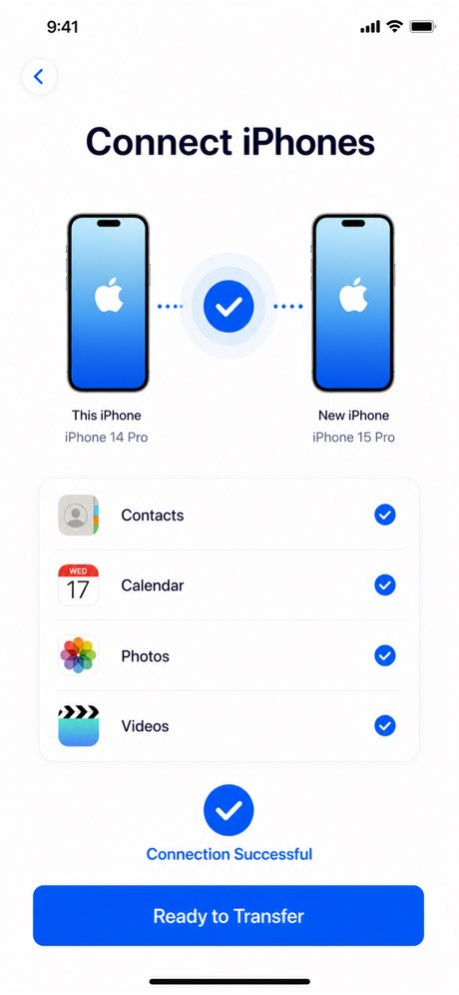
Move your photos, videos, contacts, and calendars to a new device in a simple and guided way.
Quick Start is designed to help you transfer important personal data when switching to a new phone or tablet. Connect your devices, choose the content you want to move, and start transferring with a clean, lightweight experience.
Quick Start currently supports transferring:
. Photos
. Videos
. Contacts
. Calendars
The app focuses on making device migration easier, clearer, and more private. Whether you are setting up a new device or moving important memories and personal information, Quick Start helps you transfer supported data without cables.
Key Features
Photo Transfer
Move photos from one device to another quickly and easily.
Video Transfer
Send videos wirelessly between devices.
Contacts Transfer
Transfer your contacts to your new device.
Calendar Transfer
Move calendar events so your schedule stays with you.
Wireless Transfer
Connect devices and transfer supported content without cables.
Simple Guided Experience
A clean step-by-step flow helps you choose what to send and where to send it.
Private Transfer
Your supported data is transferred directly through the app experience.
Lightweight Design
A minimal interface focused on clarity, speed, and ease of use.
Quick Start is built for anyone who wants a simpler way to move supported data to a new device.
If you encounter any issues while using the app, feel free to contact us anytime.
Service & Support
Terms of Use:
https://www.apple.com/legal/internet-services/itunes/dev/stdeula/
Privacy Policy:
https://noteable.app/privacy
Support URL:
https://noteable.app/support
Contact:
support@noteable.app
Version History Optimized data transfer speed
- Added transfer duration
- Calculated remaining transfer time 3.8 1d ago Fixed known issues
Optimized data transmission speed 3.7 Aug 9 Optimized some minor issues. 3.6 Jul 9 Fixed known issues 3.5 Jun 21 Fixed known issues
Optimized data transfer speed 3.4 Jun 15 Fixed known issues 3.3 Jun 11 Fixed known issues. 3.2 May 29 Some minor changes were made. 3.1 Jan 14 Fixed known issues 2.9 11/21/2025 Fixed known issues 2.8 10/28/2025 Optimized some issues 2.7 09/22/2025 Fixed known issues 2.6 04/07/2025 Fixed some known minor issues 2.5 02/13/2025 Now you can add quick launchers to the Control Center 2.4 10/29/2024 Fix subscription issues 2.3 10/27/2024 Fixed user-submitted issues 2.2 08/27/2024 Fix known issues and optimize user experience 1.2 01/13/2024 Fix known issues 1.08 12/15/2023 1. Fix existing problems
2. Remove all advertisements on the page 1.07 12/04/2022 1. Fix known bugs
2. Added several startup items 1.06 11/22/2022 1. Add smart home linkage
2. Fix known issues 1.05 11/03/2022 1. Fix some jumping problems
2. Modify some text description information 1.04 10/29/2022 1.0 10/27/2022
About Quick Start - Data Transfer
The company that develops Quick Start - Data Transfer is 凡 刘. The latest version released by its developer is 3.8.
To install Quick Start - Data Transfer on your iOS device, just click the green Continue To App button above to start the installation process. The app is listed on our website since 2026-10-13 and was downloaded 5 times. We have already checked if the download link is safe, however for your own protection we recommend that you scan the downloaded app with your antivirus. Your antivirus may detect the Quick Start - Data Transfer as malware if the download link is broken.
How to install Quick Start - Data Transfer on your iOS device:
- Click on the Continue To App button on our website. This will redirect you to the App Store.
- Once the Quick Start - Data Transfer is shown in the iTunes listing of your iOS device, you can start its download and installation. Tap on the GET button to the right of the app to start downloading it.
- If you are not logged-in the iOS appstore app, you'll be prompted for your your Apple ID and/or password.
- After Quick Start - Data Transfer is downloaded, you'll see an INSTALL button to the right. Tap on it to start the actual installation of the iOS app.
- Once installation is finished you can tap on the OPEN button to start it. Its icon will also be added to your device home screen.
Program Details
System requirements
Download information
Pricing
Version History
version 3.8
posted on 2026-10-13
Version History Optimized data transfer speed
- Added transfer duration
- Calculated remaining transfer time 3.8 1d ago Fixed known issues
Optimized data transmission speed 3.7 Aug 9 Optimized some minor issues. 3.6 Jul 9 Fixed known issues 3.5 Jun 21 Fixed known issues
Optimized data transfer speed 3.4 Jun 15 Fixed known issues 3.3 Jun 11 Fixed known issues. 3.2 May 29 Some minor changes were made. 3.1 Jan 14 Fixed known issues 2.9 11/21/2025 Fixed known issues 2.8 10/28/2025 Optimized some issues 2.7 09/22/2025 Fixed known issues 2.6 04/07/2025 Fixed some known minor issues 2.5 02/13/2025 Now you can add quick launchers to the Control Center 2.4 10/29/2024 Fix subscription issues 2.3 10/27/2024 Fixed user-submitted issues 2.2 08/27/2024 Fix known issues and optimize user experience 1.2 01/13/2024 Fix known issues 1.08 12/15/2023 1. Fix existing problems
2. Remove all advertisements on the page 1.07 12/04/2022 1. Fix known bugs
2. Added several startup items 1.06 11/22/2022 1. Add smart home linkage
2. Fix known issues 1.05 11/03/2022 1. Fix some jumping problems
2. Modify some text description information 1.04 10/29/2022 1.0 10/27/2022
version 3.7
posted on 2026-10-06
Version History Fixed known issues
Optimized data transmission speed 3.7 Aug 9 Optimized some minor issues. 3.6 Jul 9 Fixed known issues 3.5 Jun 21 Fixed known issues
Optimized data transfer speed 3.4 Jun 15 Fixed known issues 3.3 Jun 11 Fixed known issues. 3.2 May 29 Some minor changes were made. 3.1 Jan 14 Fixed known issues 2.9 11/21/2025 Fixed known issues 2.8 10/28/2025 Optimized some issues 2.7 09/22/2025 Fixed known issues 2.6 04/07/2025 Fixed some known minor issues 2.5 02/13/2025 Now you can add quick launchers to the Control Center 2.4 10/29/2024 Fix subscription issues 2.3 10/27/2024 Fixed user-submitted issues 2.2 08/27/2024 Fix known issues and optimize user experience 1.2 01/13/2024 Fix known issues 1.08 12/15/2023 1. Fix existing problems
2. Remove all advertisements on the page 1.07 12/04/2022 1. Fix known bugs
2. Added several startup items 1.06 11/22/2022 1. Add smart home linkage
2. Fix known issues 1.05 11/03/2022 1. Fix some jumping problems
2. Modify some text description information 1.04 10/29/2022 1.0 10/27/2022
version 3.6
posted on 2026-07-27
Version History Optimized some minor issues. 3.6 Jul 9 Fixed known issues 3.5 Jun 21 Fixed known issues
Optimized data transfer speed 3.4 Jun 15 Fixed known issues 3.3 Jun 11 Fixed known issues. 3.2 May 29 Some minor changes were made. 3.1 Jan 14 Fixed known issues 2.9 11/21/2025 Fixed known issues 2.8 10/28/2025 Optimized some issues 2.7 09/22/2025 Fixed known issues 2.6 04/07/2025 Fixed some known minor issues 2.5 02/13/2025 Now you can add quick launchers to the Control Center 2.4 10/29/2024 Fix subscription issues 2.3 10/27/2024 Fixed user-submitted issues 2.2 08/27/2024 Fix known issues and optimize user experience 1.2 01/13/2024 Fix known issues 1.08 12/15/2023 1. Fix existing problems
2. Remove all advertisements on the page 1.07 12/04/2022 1. Fix known bugs
2. Added several startup items 1.06 11/22/2022 1. Add smart home linkage
2. Fix known issues 1.05 11/03/2022 1. Fix some jumping problems
2. Modify some text description information 1.04 10/29/2022 1.0 10/27/2022
version 3.6
posted on 2026-07-16
Version History Optimized some minor issues. 3.6 6d ago Fixed known issues 3.5 Jun 21 Fixed known issues
Optimized data transfer speed 3.4 Jun 15 Fixed known issues 3.3 Jun 11 Fixed known issues. 3.2 May 29 Some minor changes were made. 3.1 Jan 14 Fixed known issues 2.9 11/21/2025 Fixed known issues 2.8 10/28/2025 Optimized some issues 2.7 09/22/2025 Fixed known issues 2.6 04/07/2025 Fixed some known minor issues 2.5 02/13/2025 Now you can add quick launchers to the Control Center 2.4 10/29/2024 Fix subscription issues 2.3 10/27/2024 Fixed user-submitted issues 2.2 08/27/2024 Fix known issues and optimize user experience 1.2 01/13/2024 Fix known issues 1.08 12/15/2023 1. Fix existing problems
2. Remove all advertisements on the page 1.07 12/04/2022 1. Fix known bugs
2. Added several startup items 1.06 11/22/2022 1. Add smart home linkage
2. Fix known issues 1.05 11/03/2022 1. Fix some jumping problems
2. Modify some text description information 1.04 10/29/2022 1.0 10/27/2022
version 3.5
posted on 2026-06-30
Version History Fixed known issues 3.5 Jun 21 Fixed known issues
Optimized data transfer speed 3.4 Jun 15 Fixed known issues 3.3 Jun 11 Fixed known issues. 3.2 May 29 Some minor changes were made. 3.1 Jan 14 Fixed known issues 2.9 11/21/2025 Fixed known issues 2.8 10/28/2025 Optimized some issues 2.7 09/22/2025 Fixed known issues 2.6 04/07/2025 Fixed some known minor issues 2.5 02/13/2025 Now you can add quick launchers to the Control Center 2.4 10/29/2024 Fix subscription issues 2.3 10/27/2024 Fixed user-submitted issues 2.2 08/27/2024 Fix known issues and optimize user experience 1.2 01/13/2024 Fix known issues 1.08 12/15/2023 1. Fix existing problems
2. Remove all advertisements on the page 1.07 12/04/2022 1. Fix known bugs
2. Added several startup items 1.06 11/22/2022 1. Add smart home linkage
2. Fix known issues 1.05 11/03/2022 1. Fix some jumping problems
2. Modify some text description information 1.04 10/29/2022 1.0 10/27/2022
version 3.2
posted on 2026-06-05
Version History Fixed known issues. 3.2 6d ago Some minor changes were made. 3.1 Jan 14 Fixed known issues 2.9 11/21/2025 Fixed known issues 2.8 10/28/2025 Optimized some issues 2.7 09/22/2025 Fixed known issues 2.6 04/07/2025 Fixed some known minor issues 2.5 02/13/2025 Now you can add quick launchers to the Control Center 2.4 10/29/2024 Fix subscription issues 2.3 10/27/2024 Fixed user-submitted issues 2.2 08/27/2024 Fix known issues and optimize user experience 1.2 01/13/2024 Fix known issues 1.08 12/15/2023 1. Fix existing problems
2. Remove all advertisements on the page 1.07 12/04/2022 1. Fix known bugs
2. Added several startup items 1.06 11/22/2022 1. Add smart home linkage
2. Fix known issues 1.05 11/03/2022 1. Fix some jumping problems
2. Modify some text description information 1.04 10/29/2022 1.0 10/27/2022
version 3.1
posted on 2026-01-14
Some minor changes were made.
version 2.7
posted on 2025-09-22
Sep 22, 2025
Version 2.7
Optimized some issues
version 2.6
posted on 2025-04-07
Apr 7, 2025
Version 2.6
Fixed known issues
version 2.5
posted on 2025-02-13
Feb 13, 2025
Version 2.5
Fixed some known minor issues
